
Introduction
Computers have become an essential part of everyday life, helping people complete tasks related to education, business, communication, entertainment, research, and technology. Whether someone is using a desktop computer, laptop, smartphone, tablet, or other digital device, processing information is one of the most important activities happening inside the system. Among the different components responsible for making these devices work efficiently, the CPU holds a particularly important position. It is responsible for executing instructions, processing data, performing calculations, and coordinating various operations within a computer.
Understanding the full form of CPU is one of the first steps toward learning basic computer knowledge. CPU stands for Central Processing Unit, which is commonly described as the brain of a computer because it manages instructions and carries out essential processing tasks. Every time a user opens an application, types a document, plays a game, browses the internet, or performs calculations, the processor contributes to completing the operation. Learning about the CPU helps students, beginners, professionals, and technology enthusiasts understand how computers function and why processing power matters when choosing a digital device.
What Is the Full Form of CPU?
The full form of CPU is Central Processing Unit. It is the primary processing component of a computer that interprets instructions, performs calculations, and controls the execution of programs. The CPU receives instructions from software, processes the information according to those instructions, and produces results that help the computer perform different activities. It works with other hardware components, including memory, storage devices, the motherboard, and input-output devices, to maintain smooth system operation.
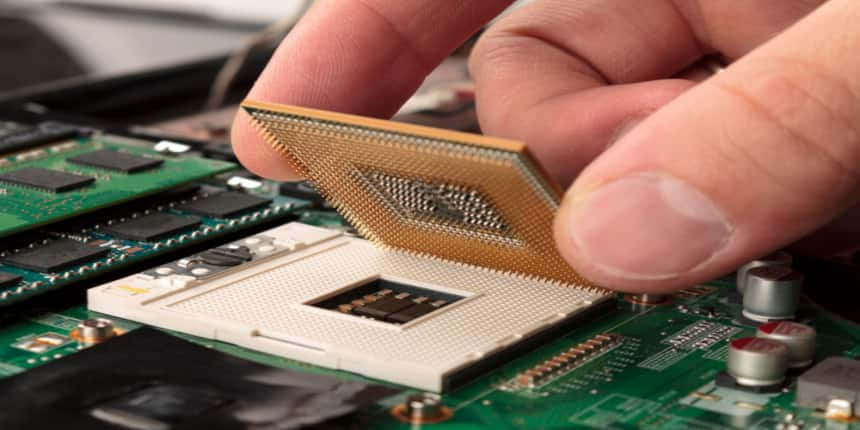
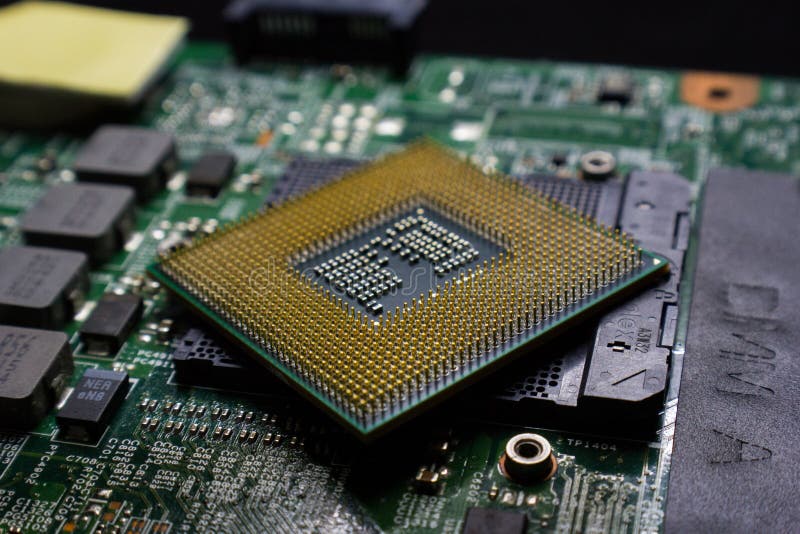
The CPU is installed on the motherboard and communicates with different parts of the computer through electrical signals and data pathways. Its performance depends on several factors, such as clock speed, core count, architecture, cache memory, power consumption, and thermal management. Modern processors are designed to handle multiple tasks efficiently, allowing users to run applications, manage files, browse websites, and perform complex computing activities. Although the CPU is not the only component responsible for computer performance, it plays a central role in determining how quickly and effectively a system executes many types of instructions.
Meaning of Central Processing Unit
The term Central Processing Unit describes the main unit responsible for processing instructions and coordinating computational activities. The word “central” refers to its important position in the computer system, “processing” means carrying out operations on data, and “unit” represents the hardware component that performs these responsibilities. Together, these words explain why the processor is considered one of the most important parts of a computer.
A computer receives information from users or other devices and processes it into useful results. For example, when someone enters numbers into a calculator application, the CPU executes the instructions needed to perform the mathematical operation. When a user opens a document, the processor helps run the application and manage the instructions required to display the information. It also supports the operating system, software applications, and background processes. Without a functioning processor, a computer would not be able to execute the instructions that make its software useful.
Why Is the CPU Called the Brain of a Computer?
The CPU is often called the brain of a computer because it performs many of the essential operations that allow the machine to function. Similar to how the human brain processes information and coordinates activities, the processor executes instructions and helps organize operations throughout the computer. It receives information, interprets commands, performs calculations, and communicates with other hardware components to complete different tasks.
However, this comparison is only a simple way of understanding its importance. A CPU does not think, understand, or make decisions in the human sense. Instead, it follows instructions created through software and encoded into machine-readable forms. These instructions determine how a computer responds to user commands and performs operations. The processor works alongside memory, storage, graphics hardware, and other components to create a complete computing experience. Its ability to execute instructions quickly and accurately makes it a fundamental part of modern technology.
Main Functions of a CPU
The processor performs several important functions that allow computers to operate properly. Its responsibilities include executing instructions, carrying out arithmetic calculations, performing logical comparisons, controlling data movement, and coordinating activities between hardware and software components. These functions take place continuously whenever the computer is running applications or performing background tasks.
1. Processing Instructions
One of the primary responsibilities of a CPU is executing instructions provided by computer programs. Software applications contain instructions that tell the system what operations should be performed. The processor reads and executes these instructions in an organized sequence, although modern CPUs may execute multiple instructions simultaneously or out of order to improve efficiency. This instruction-processing ability enables users to interact with programs, operate computer systems, and complete a wide range of digital tasks.
2. Performing Arithmetic Operations
The CPU performs mathematical calculations such as addition, subtraction, multiplication, and division. These operations are necessary for spreadsheets, calculators, accounting software, scientific applications, games, and many other programs. The processor can also handle complex mathematical calculations depending on its architecture and available instruction sets. Its ability to process numerical information quickly makes it useful for applications that require repeated calculations and accurate results.
3. Performing Logical Operations
Logical operations help computers compare information and determine whether certain conditions are true or false. The processor can compare values, check relationships, and perform operations such as AND, OR, and NOT. These activities are essential for programming, decision-making instructions, searching, sorting, and controlling application behaviour. Logical processing allows software to respond differently depending on the information it receives or the conditions that exist during execution.
4. Managing Data Movement
The CPU also helps transfer information between memory, registers, storage-related systems, and other hardware components. It coordinates the movement of data needed to execute instructions. For example, when a program requires information stored in memory, the processor retrieves the necessary data, processes it, and may return the result to memory. Efficient communication between the processor and other components contributes to the overall performance of a computer.
5. Controlling Computer Operations
Another important responsibility of the CPU is controlling and coordinating computer activities. It works with system instructions to help applications communicate with hardware and manage operations. The processor plays a role in executing operating-system instructions, responding to events, and coordinating tasks. These activities allow the computer to operate in an organized way instead of performing hardware operations without direction.
Main Components of a CPU
A processor contains several internal components that work together to execute instructions and process information. Although processor designs differ between manufacturers and generations, most CPUs include control-related circuits, arithmetic and logical processing units, registers, cache memory, and other execution resources. Each component has a specific responsibility, and their combined operation helps the processor perform tasks efficiently.
1. Arithmetic Logic Unit (ALU)
The Arithmetic Logic Unit, commonly called the ALU, performs mathematical and logical operations. It handles calculations such as addition, subtraction, multiplication, and other operations supported by the processor. It also compares values and performs logical operations that help programs make decisions. The ALU receives information from internal CPU registers, processes it according to instructions, and produces results that can be stored or used by subsequent operations. It is an essential part of the processor because nearly every computer application depends on calculations or comparisons in some form.
2. Control Unit (CU)
The Control Unit manages the execution of instructions and helps coordinate different parts of the processor. It interprets instructions and generates control signals that direct the movement of information and the operation of internal components. The Control Unit helps ensure that instructions are executed in the appropriate order and that the necessary resources are available. It also supports communication between the processor and other system components. By coordinating these activities, the Control Unit helps maintain organized and efficient computer operations.
3. Registers
Registers are small, extremely fast storage locations located inside the CPU. They temporarily hold data, instructions, addresses, and intermediate results that the processor needs during execution. Because registers are directly accessible to processing circuits, they can provide information much faster than many other forms of memory. Different registers have different purposes, including storing current instructions, memory addresses, calculation results, and processor status information. Their speed and accessibility help the CPU execute instructions efficiently.
4. Cache Memory
Cache memory is a small, high-speed memory system located within or closely integrated with the processor. It stores frequently accessed information so the CPU can retrieve it more quickly than fetching it repeatedly from main memory. Modern processors commonly use multiple cache levels, such as L1, L2, and L3, which differ in size, speed, and design. Cache memory helps reduce delays during processing and improves overall system responsiveness, particularly when programs repeatedly use similar instructions or data.
How Does a CPU Work?
The CPU works through a continuous process of receiving instructions, interpreting them, executing them, and storing or communicating the results. This process is commonly explained using the instruction cycle, which describes the basic stages of processing. Modern processors use advanced techniques such as pipelining, prediction, multiple execution units, and parallel instruction processing to improve performance, but the basic idea remains similar.
Step 1: Fetch
During the fetch stage, the processor retrieves the next instruction that needs to be executed. The instruction is usually obtained from memory and brought into the processor for processing. The CPU uses internal information, such as an instruction address, to identify where the next instruction is located. Fetching allows the processor to access the commands that make software function.
Step 2: Decode
After fetching an instruction, the processor decodes it to determine what operation must be performed. The instruction may require mathematical calculations, data movement, logical comparisons, or another activity. The processor identifies the operation and determines which internal resources are needed to complete it. Decoding helps the CPU understand the structure and purpose of the machine instruction.
Step 3: Execute
During execution, the processor carries out the operation specified by the instruction. It may perform calculations, compare information, move data, or complete another task. Different CPU components participate depending on the instruction being executed. The execution stage is where the requested operation takes place, allowing software commands to produce actual results.
Step 4: Store
After an instruction is executed, its result may be stored in a register, cache, or main memory, depending on the instruction and the requirements of the program. The result may also be used by another instruction that follows. This stage helps preserve processed information so that the computer can continue performing related operations without losing important data.
Types of CPUs
Processors are available in different designs and configurations to meet the requirements of computers, servers, mobile devices, and specialized systems. The choice of processor depends on factors such as performance, energy efficiency, workload, compatibility, and cost.
1. Single-Core CPU
A single-core CPU contains one main processing core that executes instructions. Older computers commonly used single-core processors, and some basic systems still rely on them for simple tasks. Single-core processors can perform many operations, but they have limited capacity for handling multiple demanding tasks simultaneously compared with modern multicore processors.
2. Dual-Core CPU
A dual-core processor contains two processing cores on a single chip. These cores can execute separate instructions and help the computer manage multiple activities more effectively. Dual-core processors are useful for basic computing, office work, web browsing, and lightweight applications. They generally offer improved multitasking capabilities compared with single-core designs.
3. Quad-Core CPU
A quad-core processor contains four processing cores. It can handle multiple threads of work more efficiently when software is designed to take advantage of additional cores. Quad-core CPUs are commonly found in desktops, laptops, and mobile devices. They can provide a balanced level of performance for everyday tasks, productivity applications, and moderate workloads.
4. Multicore CPU
Multicore processors contain several processing cores integrated into one chip. Depending on the design, a processor may have four, six, eight, twelve, or even more cores. Multicore technology helps improve multitasking and performance in applications that can distribute work across multiple cores. It is particularly beneficial for video editing, software development, rendering, data processing, and other demanding activities.
CPU Clock Speed and Performance
CPU clock speed refers to the rate at which a processor operates its clock cycles. It is commonly measured in gigahertz (GHz). A processor with a higher clock speed may be capable of executing more clock cycles per second, but clock speed alone does not determine overall performance. Different processors can perform different amounts of work during each clock cycle because of differences in architecture, instructions, cache, core count, and other design characteristics.
For example, a processor operating at 4 GHz does not automatically perform better than every processor operating at 3 GHz. The higher-clocked CPU may be faster in certain tasks, but a processor with a more advanced design may deliver better results despite having a lower clock speed. Cooling, power limits, workload, and software optimization also influence actual performance. Therefore, users should consider several specifications rather than relying only on the GHz number when comparing processors.
Difference Between CPU and Other Computer Components
The CPU is often confused with other computer components because all of them contribute to the functioning of a digital device. However, each component has a different responsibility. Understanding these differences makes it easier to learn computer fundamentals and identify the purpose of individual hardware parts.
| Component | Main Function |
|---|---|
| CPU | Executes instructions and processes data |
| RAM | Temporarily stores active programs and data |
| GPU | Processes graphics and parallel computing workloads |
| HDD/SSD | Stores files, applications, and operating-system data |
| Motherboard | Connects hardware components and enables communication |
| PSU | Supplies electrical power to computer components |
CPU vs RAM
The CPU processes instructions, while RAM temporarily stores information that applications and the operating system are actively using. The processor frequently reads information from RAM and writes processed results back to it. RAM is not responsible for executing program instructions in the same way as the CPU. Both components are important because a fast processor may experience delays when insufficient memory is available or when memory communication becomes a bottleneck.
CPU vs GPU
A CPU is designed to handle a wide range of instructions and general computing tasks. A GPU, or Graphics Processing Unit, is designed to perform many operations in parallel, making it particularly useful for graphics rendering, gaming, artificial intelligence, simulations, and other workloads. CPUs and GPUs often work together. The CPU manages program instructions and overall system operations, while the GPU handles workloads that benefit from parallel processing.
Importance of the CPU in Everyday Life
The CPU plays an important role in almost every area of modern computing. In education, it helps students run learning applications, prepare presentations, complete assignments, and participate in online classes. In business, processors support accounting software, communication tools, databases, office applications, and digital management systems. In entertainment, CPUs help operate games, streaming applications, multimedia software, and other digital services.
In addition, processors are essential for scientific research, engineering, artificial intelligence, automation, healthcare technology, and industrial systems. They help process information, manage complex instructions, and support digital tools that people use regularly. Understanding the full form of CPU and its role gives students and beginners a better foundation for learning about computer hardware, technology careers, and digital systems. It also helps consumers make informed decisions when purchasing computers or upgrading their devices.
How to Choose the Right CPU
Choosing a suitable processor depends on how the computer will be used. For everyday activities such as browsing, online classes, document editing, and watching videos, an entry-level or midrange processor may provide sufficient performance. Users who work with programming, multitasking, photo editing, or demanding applications may benefit from processors with stronger performance and more cores.
Gaming users should consider the processor alongside the graphics card, memory, and monitor resolution. Professionals working with video editing, 3D rendering, software development, virtualization, or data analysis may require higher-performance CPUs with more cores and advanced capabilities. Other important considerations include power consumption, compatibility with the motherboard, cooling requirements, upgrade options, and budget. Selecting the right processor involves balancing these factors rather than choosing a model based only on its brand or clock speed.
Common CPU-Related Terms
Learning a few processor-related terms can help beginners understand computer specifications more easily.
-
Core: An individual processing unit within a CPU that can execute instructions.
-
Thread: A sequence of instructions or a software execution path that can be scheduled for processing.
-
Clock speed: The operating frequency of a processor, usually measured in GHz.
-
Cache: High-speed memory used to store frequently accessed data and instructions.
-
Socket: The physical connection used to install a compatible processor on a motherboard.
-
Thermal management: The process of controlling heat produced during processor operation.
-
Architecture: The design and organization of a processor, including how it executes instructions.
These terms are useful when comparing CPUs, understanding technical specifications, and learning how hardware affects computer performance.
Frequently Asked Questions (FAQs)
1. What is the full form of CPU?
CPU stands for Central Processing Unit. It is the primary processing component of a computer that executes instructions, performs calculations, and coordinates system operations. It is commonly known as the brain of the computer because it manages many important processing activities.
2. Why is a CPU important in a computer?
The CPU is important because it executes software instructions, processes information, performs mathematical operations, and coordinates activities between different hardware components. Without a working CPU, a computer cannot perform its normal computing tasks.
3. What are the main parts of a CPU?
The main components commonly associated with a CPU include the Arithmetic Logic Unit (ALU), Control Unit (CU), registers, and cache memory. These components work together to execute instructions, perform calculations, manage information, and improve processing efficiency.
4. What is the difference between CPU and processor?
The terms CPU and processor are generally used interchangeably when discussing computer hardware. Both commonly refer to the Central Processing Unit, which executes instructions and processes data. In everyday computer terminology, a processor usually means the CPU installed in a computer or digital device.
5. Does a higher CPU clock speed mean better performance?
A higher clock speed can improve performance in certain applications, but it does not always mean that one processor is better than another. CPU architecture, core count, cache size, power limits, workload, and software optimization also influence processing performance.
6. Where is the CPU located?
In desktop computers, the CPU is installed in a socket on the motherboard and usually covered by a cooling system. In laptops and smartphones, processors are often integrated into compact designs with specialized cooling and power-management systems.
Conclusion
The Central Processing Unit is one of the most essential components of a computer because it executes instructions, performs calculations, manages logical operations, and coordinates different activities within the system. From basic document editing and web browsing to gaming, programming, scientific research, and professional computing, the processor supports a wide range of digital activities. Its performance depends on several factors, including architecture, clock speed, core count, cache memory, and power efficiency.
Learning the full form of CPU provides a basic understanding of how computers work and why processors are important in modern technology. By understanding the CPU’s functions, components, types, and performance characteristics, beginners can develop stronger computer knowledge and make better decisions when selecting or upgrading their devices. As technology continues to evolve, processors will remain a fundamental part of computers, smartphones, smart devices, and many other systems that shape our digital world.