
Introduction
Computers have become an essential part of modern life. They are used in schools, offices, hospitals, banks, businesses, industries, research centers, homes, and almost every area that depends on digital information. Students often encounter questions about computer basics, including the full form of computer, its functions, components, types, and importance. Understanding these fundamentals provides a useful foundation for learning about information technology and digital systems. A computer is an electronic machine that accepts data, processes it according to instructions, stores information, and produces useful results. Although the word computer is commonly associated with desktops and laptops, modern computing devices include smartphones, tablets, servers, embedded systems, and many specialized machines. Learning the basic meaning of the term, along with the development and applications of computers, can help students and beginners understand how digital technology works and why computers play such an important role in everyday activities.
What Is the Full Form of Computer?
The commonly taught full form of computer is Common Operating Machine Purposely Used for Technological and Educational Research. This expansion is widely circulated in educational materials, particularly in school-level general knowledge resources. However, it is important to understand that “computer” is not officially an acronym formed from these words.
The word computer comes from the concept of computation, meaning calculation or processing information. Historically, the term was used to describe people who performed mathematical calculations before electronic computers became common. Over time, it became associated with machines capable of performing calculations and processing information automatically. Therefore, when students ask about the full form of computer, they are usually looking for the commonly taught expansion rather than an official technical acronym. Understanding this distinction helps avoid confusion when studying computer fundamentals.
Meaning of a Computer
A computer is an electronic device designed to receive data, process it, store it, and provide information or results. It works according to instructions supplied through software or programming. Unlike humans, computers do not independently understand tasks in the same way people do. They follow defined instructions and manipulate data according to programmed rules.
The basic process can be understood through four major activities: input, processing, output, and storage. A user provides information through an input device, the computer processes it using its processor and software, and the resulting information can be displayed or otherwise delivered through output devices. Data can also be stored for future use. This basic structure explains why computers are useful for everything from simple calculations to complex scientific simulations and large-scale business operations.
History of Computers
The history of computers developed over many stages. Early calculating devices were created to help people perform arithmetic and organize numerical information. Mechanical inventions gradually introduced more sophisticated methods of calculation. Later, electronic technology transformed computing by making machines faster and more capable.
Early electronic computers were extremely large and required considerable physical space. They also consumed significant amounts of electricity compared with modern devices. The development of transistors, integrated circuits, microprocessors, and advanced semiconductor technology dramatically reduced the size of computers while increasing their processing capabilities.
Modern computers are far more powerful than early machines and can perform billions or even trillions of operations per second depending on the system and workload. This development has made computing available to individuals, businesses, schools, and organizations around the world.
Main Components of a Computer
A computer system consists of several components that work together. Hardware refers to the physical parts that can be seen and touched, while software consists of programs and instructions that tell the hardware what to do. Both are necessary for a functional computing system.
Important hardware components include the central processing unit, memory, storage devices, motherboard, power supply, input devices, and output devices. The processor performs instructions and calculations, while memory provides temporary working space. Storage devices retain information for longer periods. The motherboard connects major components and allows them to communicate with one another. Together, these parts create the physical foundation of a computer.
Input Devices
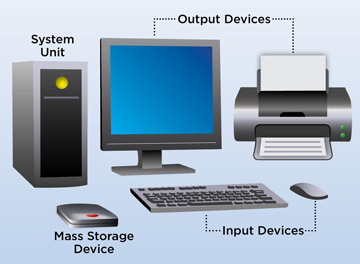
Input devices allow users to provide information and instructions to a computer. The keyboard and mouse are two of the most familiar examples. A keyboard allows users to enter letters, numbers, symbols, and commands, while a mouse provides a way to interact with graphical interfaces.
Other input devices include scanners, microphones, webcams, touchscreens, graphics tablets, and specialized sensors. The type of input device depends on the task being performed. For example, a microphone captures sound, while a scanner converts physical documents into digital information. Understanding input devices helps explain how humans communicate instructions and data to computer systems.
Processing Unit
The central processing unit, commonly called the CPU, is responsible for executing instructions and performing many of the calculations required by a computer. It is often described as the “brain” of the computer in basic educational explanations, although this is only an analogy.
Modern processors may contain multiple cores, allowing them to handle several tasks efficiently. Performance depends on many factors, including processor architecture, clock speed, number of cores, cache, software optimization, and workload. Specialized processors such as graphics processing units can also perform particular types of calculations very efficiently. Together, these technologies allow modern computers to handle everything from office applications to gaming, artificial intelligence, engineering simulations, and scientific research.
Memory and Storage
Memory and storage perform different functions. Random access memory, or RAM, provides temporary space for information and programs currently being used. When a computer is switched off, information stored in RAM is generally lost. Storage devices, on the other hand, are designed to retain data even when the system is powered down.
Common storage technologies include solid-state drives and hard disk drives. Modern computers may also use external drives, memory cards, network storage, or cloud-based storage services. Understanding this distinction is important because users sometimes confuse memory with storage. More RAM can help a computer manage multiple active applications, while greater storage capacity allows users to retain more files, programs, photos, videos, and other information.
Types of Computers
Computers come in many forms and sizes. Desktop computers are commonly used in homes, schools, offices, and professional environments. Laptops provide similar capabilities in a portable design. Tablets and smartphones combine computing power with touchscreen interfaces and communication features.
More specialized systems include servers, workstations, mainframes, and supercomputers. Servers provide services or resources to other computers across networks. Workstations are designed for demanding professional workloads such as engineering, design, animation, and scientific applications. Mainframes are used by large organizations for high-volume transaction processing, while supercomputers are built for extremely demanding computational tasks.
Uses of Computers in Education
Computers have transformed education by making digital learning resources widely accessible. Students can use computers to prepare assignments, conduct research, create presentations, practice skills, attend online classes, and communicate with teachers or classmates.
Educational software can provide interactive exercises and simulations that supplement traditional classroom instruction. Computers can also support students working with subjects such as programming, mathematics, science, design, and languages. Teachers use computers for lesson planning, grading, presentations, communication, and digital resource management. As educational technology continues to develop, understanding the full form of computer is only one small part of the broader digital literacy skills students increasingly need.
Uses of Computers in Business
Businesses depend heavily on computers for communication, accounting, inventory management, customer service, marketing, data analysis, and administration. Even small businesses may use computers to maintain financial records, manage documents, communicate with customers, and process transactions.
Larger organizations often operate complex computer networks and databases. Enterprise software can help businesses coordinate departments, monitor operations, analyze performance, and manage employees or customers. Automation can also reduce repetitive manual tasks and improve consistency. As companies generate increasing amounts of digital information, computing systems have become important tools for organizing and analyzing that information.
Computers in Healthcare
Healthcare organizations use computers for many administrative, diagnostic, research, and communication activities. Hospitals may rely on digital systems to manage patient records, appointments, billing, laboratory information, and medical images.
Researchers also use high-performance computing to analyze large datasets and conduct simulations. Medical professionals can use specialized software to support imaging, monitoring, and clinical workflows. Computers do not replace professional medical judgment, but they can provide tools that help healthcare workers manage information and perform complex tasks. Reliable data management is particularly important in healthcare because inaccurate or poorly handled information can have serious consequences.
Computers in Communication
Modern communication depends heavily on computing technology. Email, messaging applications, video conferencing, social platforms, and collaborative workspaces allow people to communicate across long distances almost instantly.
Computers also support the infrastructure behind telecommunications and internet services. Data centers contain large numbers of computing systems that process requests, store information, and deliver online services. Smartphones themselves are specialized computers capable of communication, photography, navigation, entertainment, and many other functions. This illustrates how computing has become integrated into everyday communication rather than remaining limited to traditional desktop machines.
Advantages of Computers
Computers provide several important advantages. They can process large quantities of information quickly, perform repetitive calculations consistently, store substantial amounts of data, and automate many routine tasks. They also allow people to access and share information efficiently.
Another major advantage is versatility. The same computer can be used for writing documents, analyzing data, watching videos, learning new skills, communicating with others, or running specialized professional software. Programmability allows computers to perform entirely different tasks depending on the instructions and applications being used. This flexibility is one of the main reasons computers have become fundamental to modern society.
Limitations of Computers
Despite their capabilities, computers have limitations. They depend on hardware, software, electricity, and correctly designed instructions. A computer can process information extremely quickly, but it does not automatically understand whether the information is accurate or appropriate.
Security and privacy are additional concerns. Malware, unauthorized access, data breaches, and weak passwords can create serious problems. Computers can also produce incorrect results when users provide inaccurate information or when software contains errors. Human judgment remains important when interpreting computer-generated results. Understanding these limitations is just as important as learning about the advantages of computing technology.
Importance of Computer Knowledge
Basic computer knowledge has become increasingly valuable in education and employment. People may need to use word processors, spreadsheets, email, online platforms, databases, or specialized software depending on their responsibilities. Digital skills can also help individuals communicate more effectively and access educational opportunities.
Learning basic concepts such as hardware, software, storage, processing, networks, and cybersecurity creates a foundation for more advanced subjects. Students who understand these fundamentals may find it easier to study programming, information technology, data science, artificial intelligence, or computer engineering later. The full form of computer is therefore only an introductory topic within the much larger field of computing.
Future of Computers
The future of computing is likely to involve continued improvements in processing power, energy efficiency, artificial intelligence, connectivity, and specialized hardware. Technologies such as cloud computing, edge computing, quantum computing, and advanced semiconductor systems are expanding the ways computational tasks can be performed.
Artificial intelligence is also changing how people interact with computers. Instead of always using traditional menus and commands, users can increasingly communicate with systems through natural language, voice, and intelligent interfaces. At the same time, cybersecurity and responsible technology development will remain important as computing becomes more deeply integrated into society.
Conclusion
The full form of computer commonly taught in educational contexts is “Common Operating Machine Purposely Used for Technological and Educational Research,” although this is not an official expansion of the word computer. The term itself is derived from the idea of computation and has evolved alongside the development of calculating machines and electronic information-processing systems.
Computers today are much more than devices for performing calculations. They support education, healthcare, business, communication, research, entertainment, engineering, finance, and countless other activities. Their major components, including processors, memory, storage, input devices, and output devices, work together under the direction of software to process information and perform tasks. As technology continues to advance, basic computer knowledge will remain an important part of digital literacy. Learning the full form of computer can be a useful starting point, but understanding how computers function and how they are applied provides a much broader foundation for navigating the digital world.

