
Introduction
Computers have become an essential part of modern life. They are used in schools, offices, hospitals, banks, businesses, government departments, industries, homes, and almost every area that depends on digital information. People use computers to communicate, calculate, create documents, store information, conduct research, manage businesses, design products, and access online services. Because computers are so common, students and beginners often want to understand what the word computer means and whether it has an official expanded form. Searching for the full form of computer is therefore common among students preparing for examinations and people learning basic computer concepts.
A computer is fundamentally an electronic device that receives data, processes it according to instructions, stores information, and produces useful output. Modern computers can perform millions or even billions of operations rapidly, depending on their hardware and software. Understanding the meaning, history, components, types, and applications of computers provides a foundation for learning more advanced digital technologies.
What Is the Full Form of Computer?
The commonly taught full form of computer is “Common Operating Machine Purposely Used for Technological and Educational Research.” This expansion is frequently found in educational materials, quizzes, and general-knowledge resources. However, it is important to understand that this is not an official acronym created from the word COMPUTER by the computer industry or a recognized technical standards organization.
The word “computer” comes from the concept of computation, meaning calculation or processing information. Historically, a computer referred to a person or machine that performed calculations. As electronic technology developed, the term became associated primarily with programmable electronic machines.
Therefore, when studying computer science or technology, it is more accurate to understand a computer through its functions and characteristics rather than treating the commonly quoted expansion as an official technical definition.
Meaning of a Computer
A computer is an electronic machine capable of accepting data as input, processing that data according to programmed instructions, producing output, and storing information for future use. This basic process is commonly described as the input-process-output cycle.
For example, when a student enters numbers into a calculator application, the computer receives the numbers as input. The processor performs the required calculation, and the result appears on the screen as output. The same fundamental concept applies to much more complex activities, including video editing, scientific research, financial analysis, gaming, and artificial intelligence.
Computers are valuable because they can process large amounts of information quickly and accurately when they are given appropriate instructions and reliable data.
History of Computers
The history of computing extends far beyond modern laptops and desktop computers. Early calculation devices were developed to help people perform mathematical operations. Mechanical devices such as the abacus provided basic assistance with arithmetic, while later mechanical calculators introduced more advanced capabilities.
During the nineteenth century, inventors and mathematicians developed ideas for programmable mechanical machines. Charles Babbage designed the Analytical Engine, a concept that included many characteristics associated with modern computing. Ada Lovelace is also widely recognized for her work on an algorithm intended for the Analytical Engine.
Electronic computing developed rapidly during the twentieth century. Early electronic machines were extremely large and expensive, but advances in transistors, integrated circuits, and microprocessors eventually made computers smaller, faster, and more affordable.
Main Components of a Computer
A computer system consists of hardware and software working together. Hardware refers to the physical components that can be seen and touched, while software consists of programs and instructions that tell the hardware what to do.
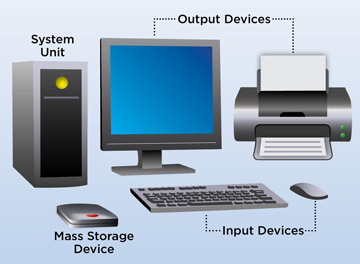
Important hardware components include the central processing unit, memory, storage devices, motherboard, input devices, output devices, and power-related components. Each part performs a specific function, but the computer depends on the interaction between them.
Software can include operating systems, applications, utilities, drivers, and other programs. Without suitable software, computer hardware cannot perform most useful tasks. Similarly, software requires hardware to execute its instructions.
Central Processing Unit
The Central Processing Unit, commonly called the CPU, is one of the most important components of a computer. It executes instructions and performs calculations required by software.
The CPU contains processing elements that handle arithmetic, logical operations, control functions, and data movement. Modern processors may contain multiple cores, allowing them to handle multiple tasks more efficiently.
CPU performance depends on several factors, including architecture, core configuration, clock speed, cache, workload, and software optimization. Therefore, a higher clock speed alone does not always mean that one processor will perform better in every situation.
Memory and Storage
Computer memory and storage serve different purposes. Random Access Memory, or RAM, provides temporary working space for programs and data that are actively being used. More RAM can allow a computer to handle multiple applications and larger workloads more comfortably, depending on the software.
Storage devices, such as solid-state drives and hard disk drives, retain data even when the computer is turned off. They store operating systems, applications, documents, photographs, videos, and other files.
Modern computers increasingly use SSDs because they can provide faster data access than traditional mechanical hard drives. However, storage capacity, performance, cost, and durability can vary between different technologies and devices.
Input Devices
Input devices allow users to provide information and instructions to a computer. The keyboard and mouse are two of the most familiar examples. Other input devices include microphones, webcams, scanners, touchscreens, game controllers, biometric sensors, and specialized industrial equipment.
Different input devices are designed for different purposes. A microphone converts sound into digital information, while a scanner can convert physical documents or images into digital files.
Input devices have become increasingly diverse as computers have moved beyond traditional desktop environments. Smartphones, vehicles, medical systems, and industrial machines all use various forms of digital input.
Output Devices
Output devices communicate processed information to users or other systems. Common examples include monitors, printers, speakers, headphones, and projectors.
A monitor displays visual information, while speakers produce audio. Printers create physical copies of digital documents and images. Some specialized computers may use other forms of output, including industrial controls, robotic systems, or digital displays.
The quality and type of output depend on the intended application. A graphic designer may require a high-quality display, while an office user may primarily need a standard monitor and printer.
Types of Computers
Computers exist in many forms and sizes. Desktop computers are designed primarily for fixed locations, while laptops provide portability. Tablets and smartphones combine computing capabilities with compact designs and touchscreen interfaces.
Servers are specialized computers that provide services or resources to other computers over a network. Mainframes are designed to handle large-scale transaction processing and workloads for organizations. Supercomputers are built for extremely demanding calculations and scientific applications.
Embedded computers are found inside devices such as vehicles, appliances, industrial machines, medical equipment, and smart-home systems. These systems demonstrate that computing technology is not limited to traditional personal computers.
Uses of Computers in Education
Computers have transformed education by providing access to digital learning materials, online classes, educational software, research resources, simulations, and communication platforms. Students can create presentations, write assignments, analyze information, practice skills, and collaborate with classmates using computers.
Teachers can use computers to prepare lessons, manage records, create educational materials, conduct assessments, and communicate with students. Digital tools can also support distance learning and provide access to educational resources beyond the physical classroom.
However, effective technology use still depends on good teaching practices. A computer is a tool that supports learning rather than automatically guaranteeing better educational outcomes.
Uses of Computers in Business
Businesses rely heavily on computers for communication, accounting, customer management, inventory control, data analysis, marketing, design, payroll, and administration. Many organizations use specialized software to automate repetitive tasks and organize large amounts of information.
Computers also support online commerce and digital payments. Employees can collaborate across different locations through communication and project-management platforms.
Data analytics and artificial intelligence have expanded the role of computers in business. Organizations can process large datasets to identify patterns, monitor operations, understand customer behavior, and support decision-making.
Uses of Computers in Healthcare
Healthcare organizations use computers for maintaining patient records, scheduling appointments, medical imaging, laboratory analysis, research, administration, and communication. Specialized computer systems can also support medical equipment and diagnostic processes.
Digital records can make information easier to organize and access when appropriate security and privacy measures are in place. Researchers use high-performance computing to analyze biological information, model diseases, and study potential treatments.
Because healthcare information is sensitive, computer systems in this field require strong security, privacy controls, and responsible data management.
Advantages of Computers
One major advantage of computers is speed. They can perform calculations and process information much faster than humans in many situations. They can also repeat tasks consistently when given correct instructions.
Computers provide large storage capacity and allow information to be searched, organized, copied, and processed efficiently. Networking enables users to communicate and share information across long distances.
Automation is another important benefit. Computers can perform repetitive tasks without continuous manual effort, allowing people to focus on activities requiring creativity, judgment, communication, and decision-making.
Limitations of Computers
Despite their capabilities, computers have limitations. They do not automatically understand whether the information they receive is accurate or appropriate. Poor data or incorrect instructions can produce unreliable results.
Computers can also be affected by hardware failures, software errors, cyberattacks, power problems, and connectivity issues. Excessive dependence on technology can create challenges when systems become unavailable.
Another limitation is that computer systems operate according to their programming and available data. Modern artificial intelligence can perform sophisticated tasks, but users still need to evaluate outputs carefully, particularly when accuracy is important.
Computers and Modern Technology
Computers are now closely connected with technologies such as cloud computing, artificial intelligence, machine learning, cybersecurity, robotics, the Internet of Things, and big-data analytics. These technologies extend traditional computing capabilities and allow systems to process increasingly complex workloads.
Cloud computing allows users and organizations to access computing resources over networks rather than relying entirely on local hardware. Artificial intelligence enables systems to analyze data, recognize patterns, generate content, and perform tasks that previously required more direct human involvement.
As technology develops, the definition of a computer is becoming broader. Computing can now take place in devices ranging from powerful data centers to tiny embedded sensors.
Importance of Computer Knowledge
Understanding the full form of computer can be a useful starting point for students, but basic computer knowledge goes much further. People should understand how hardware and software work together, how files are managed, how networks function, and how to protect digital information.
Digital literacy is increasingly important in education, employment, communication, banking, and everyday life. Knowing how to use computers safely can help people avoid scams, protect accounts, manage information, and make better use of digital services.
Students who develop strong computer fundamentals can also find it easier to explore advanced areas such as programming, data science, cybersecurity, artificial intelligence, and software development.
Future of Computers
The future of computing is likely to involve greater integration between humans, software, connected devices, and intelligent systems. Advances in processors, specialized computing hardware, quantum computing, artificial intelligence, and energy-efficient technologies may influence how computing systems develop.
Computers are also becoming increasingly embedded in everyday objects. Smart appliances, connected vehicles, wearable devices, industrial systems, and medical equipment all demonstrate how computing is moving beyond traditional screens and keyboards.
The central purpose remains similar: collecting information, processing it, storing it, and producing useful results. The technologies used to achieve these tasks continue to evolve rapidly.
Conclusion
The commonly taught full form of computer is “Common Operating Machine Purposely Used for Technological and Educational Research,” but this is not an official technical expansion of the word. The term computer is more accurately understood as a device or system capable of processing data according to programmed instructions.
From early mechanical calculating machines to modern laptops, smartphones, servers, and intelligent systems, computing technology has developed enormously. Computers now support education, business, healthcare, communication, science, entertainment, and countless other activities.
Understanding the full form of computer can provide a simple introduction to the subject, while learning about hardware, software, processing, storage, networking, security, and digital applications provides a much stronger foundation. As technology continues to advance, computer literacy will remain an important skill for students, professionals, and everyday users.

