
Introduction
Computers have become an essential part of modern life. They are used in homes, schools, offices, hospitals, banks, factories, shops, government organizations, and almost every major industry. From simple calculations and document creation to artificial intelligence, communication, research, and entertainment, computers perform a wide variety of tasks quickly and accurately. Despite their importance, many people still wonder about the full form of computer and what the word actually represents.
The commonly cited expansion of COMPUTER is “Common Operating Machine Purposely Used for Technological and Educational Research.” However, this is not an official historical acronym. The word “computer” comes from the term “compute,” meaning to calculate. A computer is essentially an electronic programmable machine that accepts data, processes it according to instructions, stores information, and produces useful results. Understanding this basic concept helps explain why computers have become so important in today’s digital world.
What Is a Computer?
A computer is an electronic device designed to receive data, process it according to programmed instructions, store information, and provide output. It can perform simple calculations as well as highly complex operations.
Unlike humans, computers can process large quantities of information at very high speeds. They do not independently understand information in the same way people do. Instead, they follow instructions provided through software and programs.
Modern computers can perform millions or even billions of operations in a very short period. Their ability to repeat tasks consistently makes them valuable in areas where speed, accuracy, and automation are important.
What Is the Full Form of Computer?
The commonly circulated full form of computer is “Common Operating Machine Purposely Used for Technological and Educational Research.”
It is important to understand that this expansion is a backronym rather than an official acronym established by computer scientists. The word computer existed before this phrase became popular.
Historically, “computer” referred to a person who performed calculations. As mechanical and electronic calculating machines developed, the word increasingly came to describe machines capable of performing computational tasks.
Therefore, understanding the historical meaning of the word is more accurate than treating the popular expansion as an official definition.
Meaning Behind the Popular Expansion
The commonly quoted expansion attempts to describe a machine used for technological and educational purposes.
“Common Operating Machine” refers broadly to a machine designed to perform operations. “Purposely Used for Technological and Educational Research” highlights two areas where computers have played an important role.
Although this phrase is useful for educational discussions, it should not be confused with the technical definition of a computer.
A computer today can be used for thousands of purposes, including communication, business, entertainment, engineering, scientific research, financial services, design, healthcare, and transportation.
How Computers Work
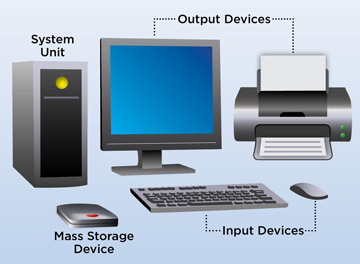
Computers generally operate through four fundamental stages: input, processing, storage, and output.
Input occurs when information is provided to the computer through devices such as keyboards, mice, microphones, cameras, scanners, or touchscreens.
The processor then performs operations according to software instructions. Data can be temporarily or permanently stored using memory and storage devices.
Finally, the computer provides output through a monitor, speaker, printer, or another device.
This basic cycle allows computers to perform a huge range of tasks.
Input Devices
Input devices allow users to communicate with computers.
A keyboard is commonly used for entering text and commands, while a mouse helps users select objects and interact with graphical interfaces.
Touchscreens allow users to provide input directly through touch.
Other input devices include microphones, cameras, scanners, biometric sensors, and specialized controllers.
Different applications require different types of input. For example, video conferencing may rely on cameras and microphones, while graphic design can require a mouse, keyboard, or drawing tablet.
Processing Unit
The central processing unit, commonly known as the CPU, performs many of the calculations and logical operations required by a computer.
It interprets instructions and coordinates various activities within the system.
Modern processors can contain multiple cores, allowing them to handle several operations efficiently.
The performance of a computer depends on more than processor speed. Memory, storage technology, software optimization, cooling, and other hardware components can also influence overall performance.
Memory and Storage
Computer memory and storage serve different purposes.
RAM, or random-access memory, provides temporary working space for active programs and data. When the computer is turned off, information stored in RAM is generally lost.
Storage devices such as solid-state drives and hard disk drives retain information even when the computer is powered down.
Modern systems often use SSDs because they can provide faster access to data compared with traditional mechanical hard drives.
Output Devices
Output devices present processed information to users.
A monitor displays text, images, videos, and graphical interfaces. Speakers provide audio output, while printers produce physical documents.
Other systems may use specialized output devices depending on their purpose.
For example, industrial computers can send signals to machines, while medical systems can display information collected from diagnostic equipment.
Types of Computers
Computers exist in many forms.
Desktop computers are commonly used in homes, offices, educational institutions, and professional environments.
Laptops provide portability by combining a display, keyboard, processor, storage, and battery into one device.
Tablets and smartphones are also powerful computing devices, although they use different hardware and operating systems from traditional personal computers.
Large organizations may use servers and specialized computing systems to manage huge amounts of information and support many users.
Supercomputers
Supercomputers are designed to perform extremely complex calculations at very high speeds.
They are used for scientific simulations, climate research, physics, engineering, space research, molecular studies, and other demanding applications.
Instead of being designed primarily for everyday activities, supercomputers focus on computational performance.
Their enormous processing capabilities allow researchers to solve problems that would take ordinary computers significantly longer to process.
Mainframe Computers
Mainframe computers are designed to process large volumes of data and support many simultaneous users or transactions.
They have historically played important roles in banking, insurance, government, transportation, and large enterprises.
Organizations that process millions of transactions can benefit from systems designed for reliability, security, scalability, and continuous operation.
Mainframes continue to have specialized roles despite the growth of cloud computing and distributed systems.
Personal Computers
Personal computers are designed primarily for individual users.
Desktop PCs and laptops are common examples.
They can be used for office work, education, programming, graphic design, gaming, internet browsing, communication, and entertainment.
The flexibility of personal computers has contributed significantly to their popularity.
Users can install software according to their requirements and upgrade certain hardware components when necessary.
Mobile Computing
Smartphones and tablets demonstrate how computing has become increasingly portable.
Modern mobile devices can perform tasks that once required desktop computers, including video editing, online banking, photography, communication, navigation, document creation, and gaming.
Mobile computing has made digital services accessible from almost anywhere with a suitable network connection.
It has also changed how people communicate, shop, learn, and consume information.
Software and Hardware
A computer requires both hardware and software to perform useful tasks.
Hardware refers to the physical components of a computer, such as the processor, memory, motherboard, storage, display, keyboard, and other devices.
Software consists of instructions that tell the hardware what to do.
Operating systems, applications, games, browsers, and professional programs are examples of software.
The interaction between hardware and software enables computers to perform practical tasks.
Operating Systems
An operating system manages computer hardware and provides an environment for applications to run.
Common operating-system categories include desktop, mobile, server, and embedded systems.
The operating system handles functions such as memory management, file management, device communication, security, and user interaction.
Without an operating system or another suitable software environment, many general-purpose computers would be difficult for ordinary users to operate.
Uses of Computers in Education
Computers have transformed education.
Students can use them to research topics, prepare presentations, write assignments, attend online classes, practice skills, and access educational resources.
Teachers can use computers to prepare lessons, manage records, communicate with students, and create digital learning materials.
Online learning has further expanded access to education by allowing students to study remotely.
Uses in Business
Businesses depend heavily on computers for daily operations.
They are used for accounting, inventory management, customer service, communication, marketing, data analysis, payroll, document management, and project coordination.
Companies can also use computer systems to automate repetitive tasks.
As businesses generate increasing amounts of information, computers help organizations organize and analyze data to support decision-making.
Uses in Healthcare
Computers play important roles in healthcare.
Hospitals and clinics use digital systems for patient records, appointment management, billing, medical imaging, laboratory systems, and communication.
Researchers also use powerful computers to analyze medical data and support scientific research.
Healthcare professionals still require appropriate training and judgment because computer-generated information does not replace professional expertise.
Uses in Banking and Finance
Banking is another area where computers are essential.
Financial institutions use computer systems to process transactions, maintain customer records, manage accounts, detect suspicious activity, and support digital banking services.
Online banking and mobile banking allow customers to perform many financial activities without visiting a physical branch.
Security is especially important in this field because financial systems handle sensitive information.
Computers in Communication
Computers have transformed communication.
Email, video conferencing, instant messaging, collaboration platforms, and social networks allow people to communicate across geographic boundaries.
Businesses can conduct meetings with teams located in different cities or countries.
Students can collaborate on projects remotely, while families can stay connected through digital communication tools.
Computers in Entertainment
Entertainment has also changed significantly because of computing technology.
People use computers to watch movies, listen to music, play games, edit videos, create digital artwork, and interact with online communities.
Modern games can provide highly detailed graphics and complex interactive environments.
Streaming services and digital media have made entertainment more accessible across computers, smartphones, televisions, and other connected devices.
Advantages of Computers
Computers offer several important advantages.
They can process information quickly, store large quantities of data, automate repetitive tasks, and perform calculations accurately when provided with correct instructions.
They also make information easier to organize and share.
In professional environments, automation can improve productivity by reducing the amount of time required for repetitive processes.
However, the quality of a computer’s output depends on the quality of its software, data, and instructions.
Limitations of Computers
Despite their capabilities, computers have limitations.
They do not possess human judgment in the ordinary sense and depend on programs and data to perform their assigned tasks.
Incorrect data or poorly designed software can produce incorrect results.
Computers also face cybersecurity threats, hardware failures, software bugs, privacy concerns, and maintenance requirements.
For these reasons, human oversight remains important.
Future of Computer Technology
Computer technology continues to develop rapidly.
Artificial intelligence, cloud computing, quantum computing, edge computing, advanced robotics, and high-performance processors are changing the capabilities of modern systems.
Computers are becoming smaller, faster, more energy-efficient, and increasingly connected.
Future systems are likely to become more integrated into transportation, healthcare, education, manufacturing, homes, and other environments.
Importance of Learning Computer Basics
Understanding computer fundamentals is useful for students, employees, entrepreneurs, and everyday users.
Basic knowledge of hardware, software, files, internet safety, cybersecurity, and digital communication can help people use technology more effectively.
Learning these concepts also provides a foundation for advanced subjects such as programming, networking, data science, cybersecurity, and artificial intelligence.
Conclusion
The full form of computer is commonly stated as “Common Operating Machine Purposely Used for Technological and Educational Research,” but this expansion is not an official historical acronym. The word computer comes from the idea of computation and originally referred to the act or person involved in performing calculations.
Today, a computer is a programmable electronic system capable of accepting input, processing data, storing information, and producing output. Computers are available in many forms, from personal computers and smartphones to servers, mainframes, and supercomputers.
They have transformed education, business, healthcare, banking, communication, entertainment, science, and countless other fields. While computers offer remarkable speed, storage, and automation, they still depend on accurate data, appropriate software, security measures, and human oversight.
Understanding the full form of computer can be a useful starting point, but learning how computers actually work provides a much deeper understanding of their role in modern society. As technology continues to advance, computer literacy will remain an important skill for navigating an increasingly digital world.

