
Introduction
Computers have become an essential part of modern life. They are used in schools, offices, businesses, hospitals, banks, industries, homes, and almost every area that depends on digital information. From simple calculations to complex scientific research, computers can process enormous amounts of data quickly and accurately. Because computers are so common, students and beginners often ask about the full form of computer and what the word actually represents.
The commonly taught expansion of COMPUTER is “Common Operating Machine Purposely Used for Technological and Educational Research.” However, it is important to understand that this is a backronym rather than an official historical expansion of the word. The term “computer” comes from the word “compute,” meaning to calculate. A computer is essentially an electronic machine that accepts data, processes it according to instructions, stores information, and produces useful output. Understanding this basic concept provides a stronger foundation for learning about computer technology.
What Is the Full Form of Computer?
The commonly circulated full form of computer is:
C – Common
O – Operating
M – Machine
P – Purposely
U – Used
T – Technological
E – Educational
R – Research
Together, it is often written as “Common Operating Machine Purposely Used for Technological and Educational Research.” This expansion is frequently found in educational materials, quizzes, and general knowledge resources.
However, the expansion should not be confused with the actual origin of the word. “Computer” is not an acronym that was originally created from these eight words. Historically, the word referred to a person or device involved in calculation, and its modern technological meaning developed over time.
For students, knowing both the commonly taught expansion and the linguistic origin gives a more accurate understanding of the term.
Meaning of a Computer
A computer is an electronic device capable of receiving data as input, processing that data according to programmed instructions, storing information, and producing output. Modern computers can perform millions or even billions of operations in a short period.
The basic process can be understood through four stages: input, processing, storage, and output. For example, when a student enters numbers into a calculator application, the keyboard or touchscreen provides input. The processor performs the required calculation, memory temporarily holds information, and the screen displays the result as output.
Computers can perform repetitive tasks consistently and can handle large quantities of information. Their flexibility allows them to support activities ranging from writing documents and browsing the internet to controlling industrial systems and analyzing scientific data.
History of Computers
The development of computers took place over many centuries. Early humans used simple tools such as counting boards and mechanical devices to assist with calculations. One famous example is the abacus, which was used in various cultures for arithmetic operations.
Mechanical calculating machines appeared much later. In the seventeenth century, inventors developed machines capable of performing specific mathematical operations. During the nineteenth century, Charles Babbage designed the Analytical Engine, a mechanical concept that included many features associated with modern computers.
Electronic computers emerged during the twentieth century. Early electronic systems were large, expensive, and consumed significant amounts of electricity. Over time, improvements in electronics led to smaller and more powerful machines. The development of transistors, integrated circuits, microprocessors, personal computers, laptops, smartphones, and cloud computing transformed computing from a specialized technology into a part of everyday life.
Main Components of a Computer
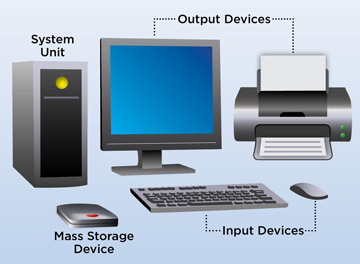
A computer system consists of several components that work together. The central processing unit, commonly called the CPU, performs instructions and manages many processing operations. Memory provides temporary space for information that the computer needs while running programs.
Storage devices retain information for longer periods. Traditional hard disk drives and modern solid-state drives are common examples of storage technology. Input devices allow users to provide information to the computer, while output devices communicate processed information back to the user.
Software is equally important. Hardware provides the physical foundation, but software contains the instructions that tell the hardware what to do. Operating systems, applications, utilities, and other programs work together to provide useful computing functions.
Input Devices
Input devices allow users to send information and commands to a computer. The keyboard is one of the most familiar input devices and is commonly used for entering text, numbers, and commands. A mouse allows users to select objects, navigate interfaces, and interact with graphical applications.
Other input devices include scanners, microphones, webcams, touchscreens, barcode readers, and specialized sensors. Different environments require different types of input technology.
For example, a hospital may use medical sensors to collect patient information, while a retail store may use barcode scanners to identify products. The development of modern input devices has made computers easier to operate and has expanded the types of information computers can process.
Processing Unit and Memory
The CPU is often described as the brain of a computer because it executes instructions and coordinates many operations. Modern processors contain multiple cores, allowing them to handle several tasks efficiently.
Memory also plays an important role. Random Access Memory, or RAM, provides temporary working space for programs and data currently in use. When a computer is turned off, information stored in RAM is generally lost.
Long-term storage serves a different purpose. Solid-state drives and hard disk drives can store documents, photographs, applications, videos, and other files even after the computer is powered off.
Together, processing power, memory, and storage determine many aspects of a computer’s performance and functionality.
Output Devices
Output devices present processed information to users. The monitor is one of the most common examples because it displays text, images, videos, and graphical interfaces. Printers can create physical copies of digital documents, while speakers and headphones provide audio output.
Other specialized output devices are used in industries, laboratories, entertainment systems, and accessibility technologies. The choice of output device depends on what type of information needs to be communicated.
For instance, a designer may require a high-quality display for visual work, while a business may depend on printers for physical documents. Output devices therefore form an important connection between computer processing and human users.
Types of Computers
Computers are available in many forms and sizes. Desktop computers are commonly used in offices, schools, homes, and professional environments. Laptops provide similar computing capabilities in a portable design.
Tablets and smartphones are also powerful computing devices. They combine processors, memory, storage, displays, cameras, communication technologies, and software into compact systems.
At the other end of the spectrum are servers and high-performance computing systems. Servers provide services such as website hosting, file storage, databases, and network management. Supercomputers are designed to perform extremely complex calculations and are used for scientific research, simulations, weather modeling, engineering, and other demanding applications.
Uses of Computers in Education
Computers have transformed education by making information and learning resources more accessible. Students can use computers to research subjects, prepare assignments, attend online classes, create presentations, practice skills, and communicate with teachers.
Educational software can provide interactive exercises and simulations that support different learning methods. Digital libraries and online resources also allow students to explore subjects beyond traditional textbooks.
Teachers use computers to prepare lessons, manage classroom information, analyze results, and communicate with students and parents. As technology continues to develop, computers remain an important part of modern education.
Uses of Computers in Business
Businesses depend heavily on computers for communication, accounting, customer management, data analysis, inventory control, marketing, and administration. Even small businesses can use computers to maintain records, create invoices, communicate with customers, and manage online operations.
Large organizations may use complex computer networks and databases to coordinate operations across multiple locations. Cloud-based software allows employees to access information and collaborate remotely.
Automation is another important application. Computers can perform repetitive processes quickly and consistently, allowing employees to focus on tasks that require judgment, creativity, communication, or specialized knowledge.
Uses of Computers in Healthcare
Computers play a major role in healthcare. Hospitals and clinics use digital systems to maintain patient records, schedule appointments, manage billing, store medical images, and support clinical workflows.
Researchers also use computers to analyze large datasets and study diseases, treatments, genetics, and public-health trends. Medical imaging systems rely on advanced computing to process information collected from diagnostic equipment.
Computers do not replace healthcare professionals, but they provide tools that can help professionals organize information and perform many technical tasks efficiently.
Advantages of Computers
One major advantage of computers is speed. They can process large quantities of information much faster than humans performing the same repetitive calculations manually. Accuracy is another benefit when systems are properly programmed and supplied with correct information.
Computers can also store enormous amounts of data and retrieve information quickly. Automation allows organizations to complete repetitive tasks efficiently, while networking enables people in different locations to communicate and share information.
Computers also support creativity. People use them to write, design graphics, edit videos, compose music, develop software, analyze data, and create digital content. Their wide range of applications makes them useful across many professions.
Limitations of Computers
Although computers are powerful, they also have limitations. A computer follows instructions and depends on the quality of its software, hardware, and input. Incorrect data can produce incorrect results, a concept often summarized as “garbage in, garbage out.”
Computers can also experience hardware failures, software errors, cybersecurity threats, and network problems. Excessive dependence on digital systems may create difficulties when systems become unavailable.
Another limitation is that computers do not independently understand every real-world situation in the same way humans do. Human judgment, creativity, ethics, communication, and contextual understanding remain important in many tasks.
Importance of Computer Knowledge
Understanding the full form of computer is only a starting point for developing digital literacy. Students and professionals benefit from understanding how computers work, how files are managed, how software operates, and how digital information should be handled responsibly.
Basic computer knowledge can improve productivity and make it easier to learn new technologies. Skills such as typing, document creation, spreadsheet use, online communication, file management, and cybersecurity awareness are valuable in education and employment.
As workplaces become increasingly digital, computer literacy is no longer limited to technology professionals. People in fields such as education, healthcare, finance, manufacturing, marketing, design, and administration regularly use digital tools.
Future of Computer Technology
Computer technology continues to develop rapidly. Artificial intelligence, cloud computing, advanced processors, robotics, quantum computing, and edge computing are influencing the future of digital systems.
Artificial intelligence can help computers identify patterns, process language, analyze images, and support decision-making. Cloud computing allows users and organizations to access computing resources through networks rather than relying entirely on local hardware.
Future computers are likely to become more powerful, efficient, connected, and specialized. These developments may create new opportunities while also introducing challenges involving privacy, security, employment, digital access, and responsible technology use.
Conclusion
The full form of computer is commonly taught as “Common Operating Machine Purposely Used for Technological and Educational Research,” but this is a popular backronym rather than the historical origin of the word. The term computer is related to calculation and has evolved into its modern meaning as electronic computing technology developed.
Computers now support education, business, healthcare, communication, entertainment, research, manufacturing, and countless other activities. Their ability to process, store, and communicate information makes them among the most important technologies of the modern world.
Learning about computers involves much more than memorizing an expansion. Understanding their components, functions, applications, advantages, and limitations provides a stronger foundation for digital literacy. As technology continues to advance, basic computer knowledge will remain valuable for students, professionals, and everyday users.

