
Introduction
Computers have become an essential part of modern life. From education and business to healthcare, communication, banking, and entertainment, computers help people complete tasks quickly and accurately. Students use computers to attend online classes, prepare assignments, and research information, while professionals depend on them for managing data, creating documents, and communicating with colleagues. As technology continues to develop, understanding basic computer concepts has become increasingly important for people of all ages.
One common question among students and beginners is about the full form of computer. Many people search for its complete meaning because they encounter the word in textbooks, competitive examinations, school projects, and general knowledge questions. A computer is an electronic device that accepts data, processes it according to instructions, stores information, and produces useful results. Although several unofficial expansions of the word are shared online, the word computer does not have an officially recognized full form. Understanding this distinction helps learners develop accurate knowledge of computer fundamentals.
What Is the Full Form of Computer?
The most important fact to understand about the full form of computer is that COMPUTER is not an officially recognized acronym. The word originated from the term “compute,” which means to calculate. Historically, a computer referred to a person who performed mathematical calculations. Over time, the word came to describe machines designed to perform calculations and other information-processing tasks.
Various websites and educational materials present the word COMPUTER as an expanded phrase, such as “Common Operating Machine Particularly Used for Technical and Educational Research.” However, this is an unofficial backronym created to explain the word in a memorable way. It is not the original meaning of the term and is not a standard technical definition.
For school assignments and examinations, students should understand the difference between an actual acronym and an invented expansion. If a teacher or examination specifically asks for a commonly circulated expansion, students may encounter such phrases. Nevertheless, the technically accurate answer is that computer is a word derived from computing rather than an acronym with a universally accepted full form.
Meaning and Definition of a Computer
A computer is an electronic machine that receives data as input, processes it using predefined instructions, stores data when necessary, and produces information as output. It can perform simple calculations, organize large amounts of information, run software applications, connect people through digital networks, and automate repetitive activities.
For example, when a student enters numbers into a calculator application, the computer processes the input and displays the result. When someone writes a document, the computer allows the user to enter text, edit sentences, save the file, and print it. These examples demonstrate how computers transform instructions and raw data into useful results.
Modern computers are capable of performing millions or billions of operations in a short period, depending on their hardware and workload. However, they require suitable instructions, programs, and data to perform meaningful tasks. They do not automatically understand every problem as humans do. Their results depend on the quality of the software, the information provided, and the way a task is defined.
History and Origin of the Word Computer
The history of computing goes back several centuries. Early calculating devices, including the abacus, helped people perform arithmetic operations. Later, mechanical calculating machines introduced more advanced methods of processing numbers. During the nineteenth century, Charles Babbage designed important mechanical computing concepts that influenced the development of modern computers.
The word “computer” originally referred to people whose occupation involved calculations. As mechanical and electronic technology advanced, the term increasingly became associated with machines capable of performing calculations automatically.
During the twentieth century, electronic computers developed rapidly. Early machines were large, expensive, and required considerable space and electricity. They were primarily used by research institutions, governments, and large organizations. Over time, improvements in electronic components made computers smaller, faster, and more affordable.
The introduction of personal computers brought computing technology into homes, schools, and offices. Later, laptops, smartphones, cloud computing, and artificial intelligence expanded the ways people interact with digital systems. Today, computers are integrated into many devices, including vehicles, medical equipment, industrial machinery, and household appliances.
Main Components of a Computer
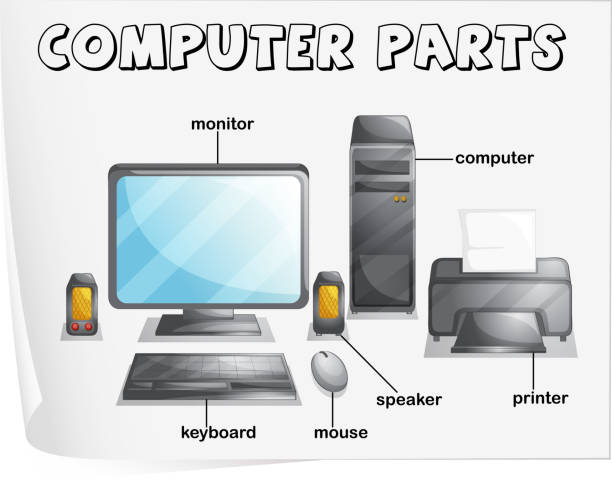
A computer consists of several hardware components that work together to process information. Each component performs a specific function, and the combined operation of these parts allows the system to execute programs and produce results.
1. Central Processing Unit (CPU)
The central processing unit is commonly described as the brain of a computer because it executes instructions and performs calculations. It coordinates many processing activities and works with other hardware components. CPU performance depends on several factors, including architecture, clock speed, core count, and workload.
2. Monitor
A monitor is an output device that displays text, pictures, videos, and other visual information. It enables users to interact with applications and view the results of their work. Modern monitors use technologies such as LCD and OLED to produce images.
3. Keyboard
A keyboard is an input device used to enter letters, numbers, symbols, and commands. Students use keyboards to prepare assignments, while office workers use them to create documents, enter records, and communicate online.
4. Mouse
A mouse allows users to move a pointer, select items, click buttons, and interact with graphical interfaces. Touchpads and touchscreen controls can provide similar functions on certain devices.
5. Memory and Storage
Random Access Memory (RAM) temporarily holds the information and instructions a computer is actively using. Storage devices, such as solid-state drives and hard disk drives, retain files and programs even when the computer is switched off.
6. Motherboard
The motherboard is the main circuit board that connects the CPU, memory, storage interfaces, and other components. It enables different parts of the computer to communicate with one another.
How Does a Computer Work?
A computer generally works through four basic stages: input, processing, output, and storage. These stages are commonly used to explain the fundamental operation of computing systems.
Input: The computer receives data through devices such as keyboards, mice, cameras, microphones, and sensors.
Processing: The CPU and other system components execute instructions that transform the input into useful results.
Output: The processed information is presented through a monitor, printer, speaker, or another output device.
Storage: Data and results can be saved for future use in memory or long-term storage devices.
Consider a simple example of preparing a school assignment. A student enters text using a keyboard, edits the document with software, saves the file on a storage device, and views the finished work on a monitor. The same basic principles apply to more complex tasks, including scientific calculations, financial transactions, and digital communication.
Different Types of Computers
Computers are available in various forms, depending on their purpose, size, performance, and design.
Supercomputers
Supercomputers are designed to handle extremely demanding computational tasks. They are used in climate modelling, scientific simulations, advanced research, and complex mathematical calculations. Their powerful processing capabilities allow researchers to analyse enormous amounts of data.
Mainframe Computers
Mainframe computers support large-scale data processing and transactions. Banks, government departments, insurance companies, and other large institutions may use mainframe systems to manage extensive workloads and support many users.
Desktop Computers
Desktop computers are commonly used in homes, schools, laboratories, and offices. They typically include a separate monitor, keyboard, mouse, and computer unit. They are useful for everyday productivity, education, gaming, and professional work.
Laptop Computers
Laptops are portable computers with integrated screens, keyboards, batteries, and pointing devices. They allow users to work in different locations, making them suitable for students, travellers, remote workers, and business professionals.
Tablets and Smartphones
Tablets and smartphones provide computing features in compact, portable formats. They support communication, browsing, video streaming, photography, productivity applications, and many other activities.
Embedded Computers
Embedded computers are built into larger systems to control specific functions. Examples include washing machines, traffic control systems, vehicle electronics, medical equipment, and industrial automation devices.
Uses of Computers in Everyday Life
Computers support a wide range of activities across different sectors. Their usefulness comes from their ability to process information, automate repetitive work, store records, and help people communicate.
Education
Schools and colleges use computers for digital classrooms, online examinations, presentations, research, and educational software. Students can access learning materials, practise new skills, and collaborate on projects. Teachers use computers to prepare lessons, maintain records, and evaluate student performance.
Business and Offices
Businesses use computers to maintain accounts, prepare reports, manage inventory, communicate with customers, and analyse sales information. Automated systems help organizations improve efficiency and reduce the time required for routine administrative tasks.
Healthcare
Hospitals and clinics use computer systems to maintain patient records, schedule appointments, manage laboratory results, and support medical imaging. Specialized software can also assist qualified professionals with analysis and treatment planning.
Banking and Finance
Computers support electronic payments, account management, online banking, fraud monitoring, and financial reporting. Secure systems allow customers and institutions to process transactions without relying entirely on paper-based methods.
Communication
Email, messaging applications, video conferencing, and social networking services rely on computing systems. These technologies help people exchange information and collaborate across geographical boundaries.
Entertainment
Computers support gaming, music production, video editing, animation, and digital streaming. Creative professionals use specialized applications to produce content, while ordinary users enjoy movies, games, and other digital media.
Advantages of Computers
Computers offer many benefits when they are used appropriately. One major advantage is speed. They can process large amounts of information much faster than manual methods. They also provide accuracy when the data, instructions, and software are correct.
Another advantage is storage capacity. Computers can keep large collections of documents, photographs, records, and other files in relatively small physical spaces. Users can search for information and retrieve saved files without manually checking every record.
Computers also support automation. Repetitive activities such as calculating totals, organizing spreadsheets, generating reports, and processing transactions can be completed with less manual effort. This can improve productivity and allow people to focus on tasks that require judgment and creativity.
Furthermore, computers make information and communication more accessible. Through the internet, people can learn new skills, collaborate with colleagues, access public services, and communicate with others around the world. However, these benefits depend on reliable technology, appropriate training, and responsible use.
Disadvantages and Limitations of Computers
Despite their benefits, computers also have limitations. Excessive screen time can contribute to eye discomfort, poor posture, and reduced physical activity. Users can reduce these risks by taking regular breaks, maintaining suitable workstation ergonomics, and balancing screen-based activities with exercise.
Cybersecurity is another important concern. Malware, phishing, weak passwords, and data breaches can expose personal or organizational information. Users should apply security updates, use strong and unique passwords, enable multifactor authentication where possible, and avoid suspicious attachments or websites.
Computers can also produce incorrect results when the input data is inaccurate or the instructions are poorly designed. Automated systems may repeat mistakes quickly if their processes are not checked. In addition, excessive dependence on technology can create difficulties when systems fail or access to electricity and networks is interrupted.
Responsible computer use therefore requires technical knowledge, digital awareness, data protection practices, and a willingness to verify important information.
Importance of Learning Computer Basics
Learning computer basics helps people participate more effectively in today’s digital environment. Students benefit from understanding file management, word processing, spreadsheets, presentations, and safe internet browsing. These skills support academic activities and can prepare them for future employment.
Professionals also need digital skills to communicate, organize information, collaborate with teams, and use workplace software. Even people who do not work directly in technology may need to complete online forms, access digital banking, attend virtual meetings, or use government services.
Understanding the full form of computer is one small part of computer literacy, but it introduces learners to a broader subject. As they progress, they can explore hardware, software, networking, programming, cybersecurity, and emerging technologies. Building this knowledge gradually makes computers easier to understand and use confidently.
Frequently Asked Questions (FAQs)
1. What is the full form of computer?
Computer does not have an officially recognized full form. The word comes from “compute,” meaning to calculate. Some educational sources share unofficial expansions, but these should not be treated as established technical definitions.
2. What is the basic definition of a computer?
A computer is an electronic device that accepts data, processes it according to instructions, stores information, and produces output. It performs a wide range of tasks, including calculations, communication, and document creation.
3. Who is known as the father of the computer?
Charles Babbage is widely known as the father of the computer because of his pioneering designs for mechanical calculating machines, including the Analytical Engine.
4. What are the four basic functions of a computer?
The four basic functions are input, processing, output, and storage. Together, these functions explain how a computer receives data, transforms it, presents results, and saves information.
5. Why are computers important for students?
Computers help students research topics, attend online classes, prepare assignments, create presentations, practise digital skills, and access educational resources. They also help students develop technology skills that are useful in higher education and employment.
6. What is the difference between hardware and software?
Hardware refers to the physical parts of a computer, such as the keyboard, monitor, CPU, and storage drive. Software consists of programs and instructions that tell the hardware what tasks to perform.
Conclusion
Computers have transformed how people learn, work, communicate, and manage information. They are essential tools in education, business, healthcare, banking, scientific research, and entertainment. By understanding their components, functions, types, advantages, and limitations, beginners can develop a strong foundation in digital technology.
The key point about the full form of computer is that the word does not have an officially accepted expansion. It originated from the concept of computing, or performing calculations, and gradually became the name for electronic machines that process information. Learning this distinction helps students avoid confusion and build accurate general knowledge. As technology continues to advance, computer literacy will remain an important skill for personal development, academic success, and professional growth.

